

Last updated: February 22, 2026
Key Takeaways
• Septic tank backups cause sewage to flow backward into your home through drains, toilets, and sinks
• Multiple drains backing up simultaneously indicates a septic system problem, not isolated plumbing issues
• Immediate signs include slow drainage, gurgling sounds, foul odors, and wet spots in your yard
• Most backups result from overfull tanks that haven’t been pumped in 3-5 years
• Quick action can prevent thousands in damage and serious health hazards
Quick Answer
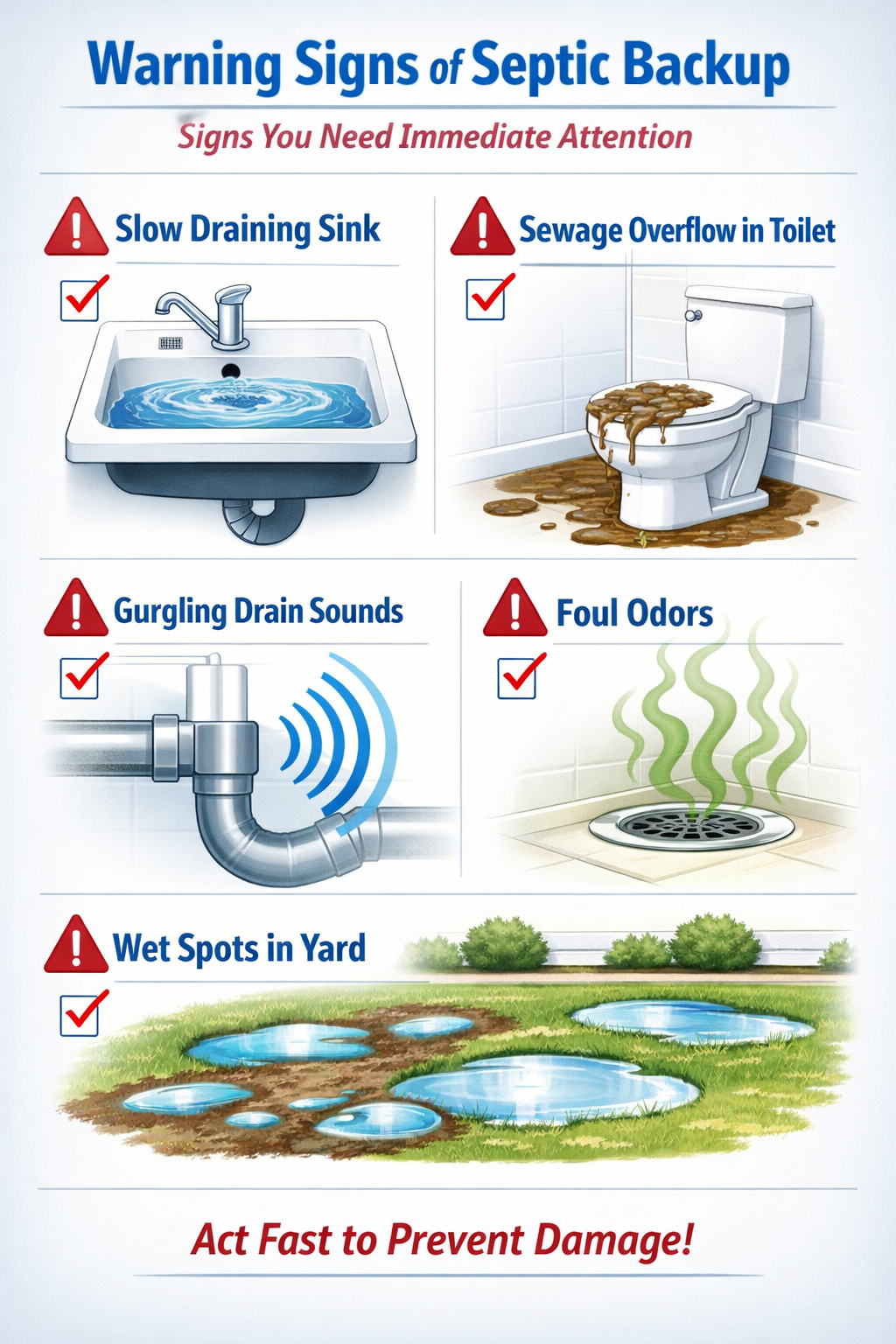
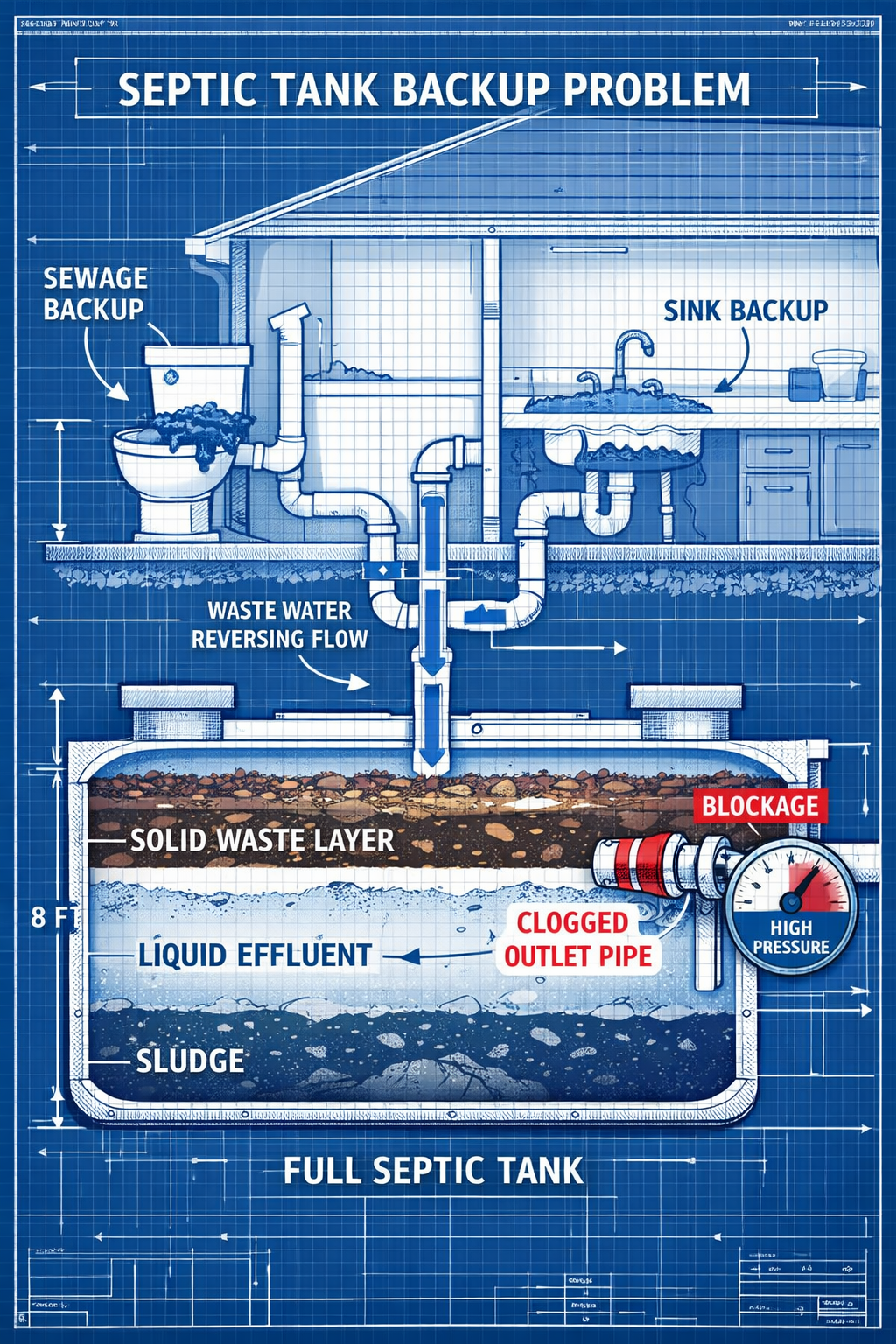
What happens when a septic tank backs up? When a septic tank backs up, sewage and wastewater flow backward through your home’s plumbing system instead of properly draining away. This causes toilets to overflow, sinks to fill with dirty water, and foul-smelling waste to emerge from multiple drains throughout your house. The backup occurs because the tank is too full, the drain field is clogged, or pipes are blocked, preventing normal wastewater flow.
Picture this: you flush the toilet and instead of everything disappearing, dirty water starts bubbling up from your shower drain. That’s exactly what happens when a septic tank backs up, and it’s every homeowner’s nightmare. Understanding what happens when a septic tank backs up can help you recognize the warning signs early and take action before a minor issue becomes a major disaster.
How Do You Know When Your Septic Tank Is Backing Up?
Multiple drains in your home will show problems at the same time, unlike typical plumbing clogs that affect only one fixture. When your septic system fails, the backup affects your entire house because all drains connect to the same overwhelmed system.
The most obvious signs include:
Immediate household symptoms:
• Toilets that won’t flush or overflow when flushed
• Sinks and bathtubs that drain very slowly or not at all
• Gurgling sounds coming from drains when you use other fixtures
• Sewage odors inside your home, especially near bathrooms and laundry areas
• Dark, dirty water backing up into sinks, tubs, or floor drains
Outdoor warning signs:
• Wet, soggy areas in your yard near the drain field
• Strong sewage smells outside your home
• Unusually green, lush grass over your septic tank or drain field
• Standing water or sewage on the ground surface
The key difference between a septic backup and regular plumbing problems is scope. If only your kitchen sink is slow, you probably have a local clog. But when your toilet won’t flush AND your shower drains slowly AND you smell sewage, that’s your septic system crying for help.
Common mistake: Many homeowners try to fix individual drains with chemical cleaners when multiple drains are affected. This wastes time and can actually damage your septic system’s beneficial bacteria.
What Causes a Septic Tank to Back Up?
The most common cause is an overfull tank that hasn’t been pumped in years, allowing solid waste to overflow into the drain field and block normal wastewater flow. Most residential septic tanks need pumping every 3-5 years, but many homeowners forget this critical maintenance.
Primary causes include:
Tank capacity issues:
• Accumulated solid waste takes up space meant for liquid processing
• Grease and scum layers become too thick
• Tank hasn’t been pumped within the recommended timeframe
• Household size has increased beyond the tank’s design capacity
Drain field problems:
• Soil around pipes becomes saturated and can’t absorb more water
• Tree roots infiltrate and damage pipes
• Non-biodegradable materials clog the soil filtration system
• Heavy machinery has compacted the soil above the drain field
System overload:
• Excessive water use during holidays or events
• Heavy rainfall saturating the ground
• Multiple loads of laundry done in one day
• Guests staying for extended periods
Pipe blockages:
• Flushing items that don’t break down (wipes, feminine products, cat litter)
• Grease buildup in pipes leading to the tank
• Damaged or collapsed pipes due to age or ground shifting
Choose professional pumping if your tank hasn’t been serviced in over 3 years. Choose drain field inspection if you notice wet spots in your yard even during dry weather.
What Happens Inside Your Home During a Septic Backup?
Sewage and contaminated water will emerge from the lowest drains first, typically basement floor drains, then work upward through your plumbing system. This creates a serious health hazard and can cause thousands of dollars in property damage if not addressed immediately.
The progression typically follows this pattern:
Stage 1 – Early warning signs:
• Toilets flush slowly or incompletely
• Gurgling sounds when using sinks or washing machines
• Slight sewage odors, especially in basements
• Water backing up briefly in tubs when toilets are flushed
Stage 2 – Active backup:
• Dark water with solid waste appears in floor drains
• Toilets overflow when flushed
• Sinks fill with dirty water that won’t drain
• Strong sewage smells throughout affected areas
Stage 3 – Full system failure:
• Multiple fixtures overflow simultaneously
• Standing sewage water on floors
• Complete loss of drainage throughout the house
• Potential electrical hazards if water reaches outlets
Health and safety concerns:
Raw sewage contains harmful bacteria, viruses, and parasites that can cause serious illness. Anyone exposed should wash thoroughly with soap and hot water. Children and pets should be kept away from affected areas until professional cleanup is complete.
Property damage risks:
• Flooring, carpets, and furniture can be permanently damaged
• Drywall and insulation may need replacement if sewage reaches wall cavities
• Personal belongings in basements are at high risk
• Structural damage possible if backup continues for extended periods
Quick decision rule: If you see any sewage backup inside your home, treat it as an emergency. Don’t wait to see if it gets worse.
What Should You Do When Your Septic Tank Backs Up?
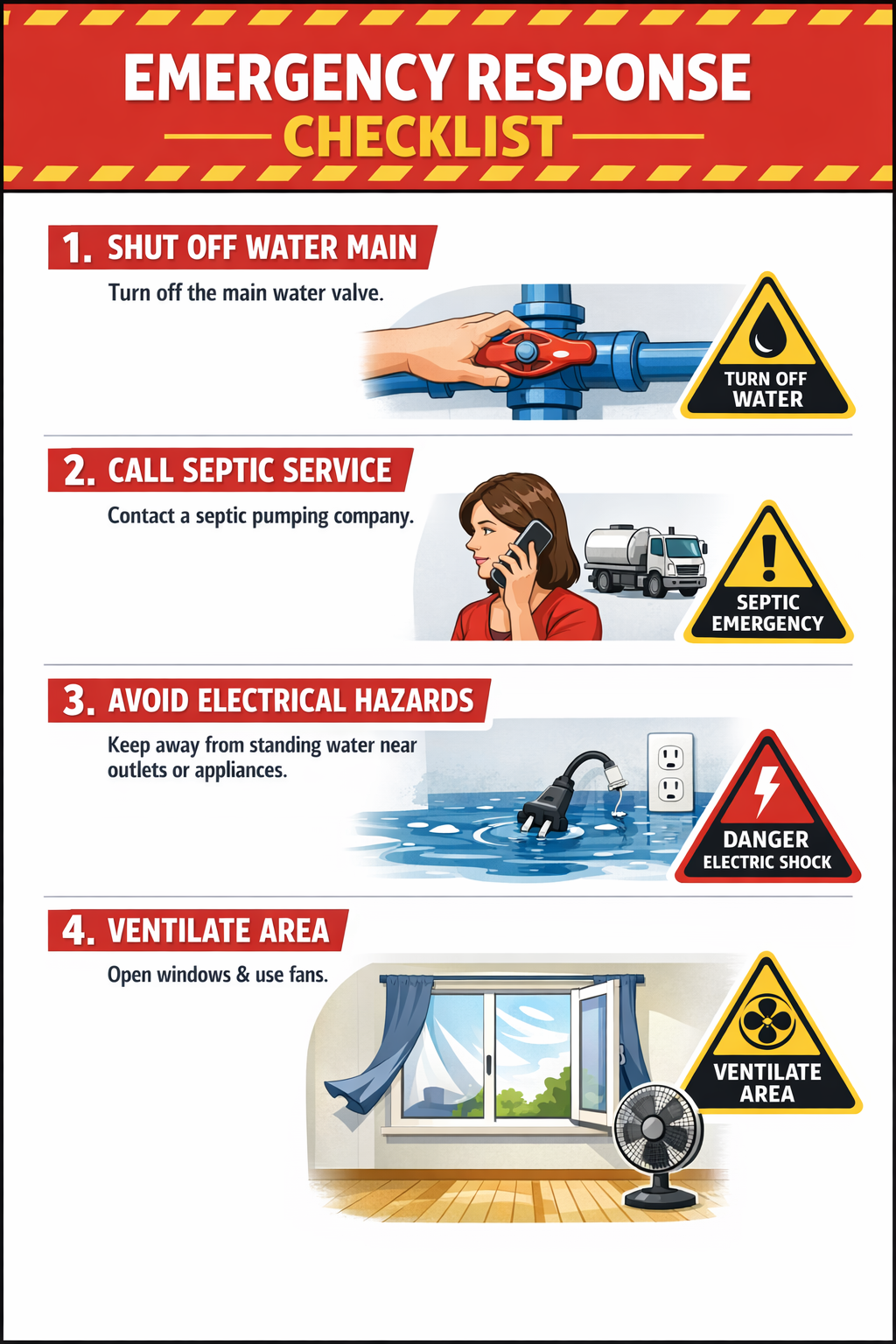
Stop using all water immediately and contact a septic pumping service right away. Every gallon of additional water you put into the system will worsen the backup and potentially cause more sewage to enter your home.
Immediate emergency steps:
1. Stop all water use:
• Don’t flush toilets, run sinks, or use appliances
• Turn off your water main if the backup is severe
• Warn family members not to use any plumbing
2. Ensure safety:
• Turn off electricity to affected areas if standing water is present
• Keep children and pets away from contaminated areas
• Wear rubber gloves and boots if you must enter affected spaces
• Ventilate the area by opening windows and doors
3. Contact professionals:
• Call a licensed septic pumping company immediately
• Take photos for insurance documentation before cleanup
• Contact your insurance company to report potential damage
4. Begin damage control:
• Remove valuable items from affected areas
• Use fans to improve air circulation
• Don’t use bleach or chemical cleaners, which can harm septic bacteria
What NOT to do:
• Don’t keep flushing toilets hoping the problem will clear
• Don’t pour chemical drain cleaners down affected drains
• Don’t try to pump out standing water yourself without professional guidance
• Don’t ignore the problem hoping it will resolve on its own
FYI: Some links may be affiliate links, which means I may earn a small commission at no extra cost to you.
For ongoing maintenance after the emergency is resolved, consider products like Septifix tablets. These monthly treatments help break down waste, reduce odors, and maintain proper bacterial balance in your septic tank. While not a solution for active backups, they can help prevent future problems when used as part of regular maintenance.
How Much Does It Cost to Fix a Septic Tank Backup?
Emergency pumping typically costs $300-600, but total repair costs can range from $1,000-15,000 depending on the extent of system damage and home cleanup required. The final bill depends on what caused the backup and how long it continued before being addressed.
Typical cost breakdown:
| Service | Cost Range | Notes |
|---|---|---|
| Emergency pumping | $300-600 | Higher rates for weekend/holiday calls |
| Drain field repair | $2,000-10,000 | Depends on soil conditions and accessibility |
| Pipe replacement | $500-3,000 | Varies by length and depth of pipes |
| Home cleanup | $1,000-8,000 | Professional remediation recommended |
| Tank replacement | $3,000-8,000 | Only needed in severe cases |
Factors affecting cost:
• Time of service: Emergency calls cost 25-50% more than scheduled service
• Extent of damage: Minor backups cost less than full system failures
• Home damage: Professional cleanup and restoration add significantly to costs
• System age: Older systems often need more extensive repairs
• Local regulations: Some areas require permits for major septic work
Insurance coverage:
Most homeowner’s insurance policies don’t cover septic system failures, but they may cover resulting home damage. Check your policy details and consider septic system insurance if available in your area.
Money-saving tip: Regular maintenance costs $200-400 per year but prevents most expensive emergency repairs. Pumping every 3-5 years is much cheaper than emergency repairs.
How Can You Prevent Septic Tank Backups?
Schedule regular pumping every 3-5 years and avoid flushing anything except toilet paper and human waste. Prevention costs a fraction of emergency repairs and keeps your family safe from sewage exposure.
Essential prevention strategies:
Maintain proper pumping schedule:
• Pump every 3-5 years for average households
• More frequent pumping for larger families or heavy water use
• Keep records of when your tank was last serviced
• Schedule pumping before the tank reaches capacity
Watch what goes down drains:
• Flush only toilet paper and human waste
• Never flush wipes, feminine products, or cat litter
• Avoid putting grease, oil, or food scraps down drains
• Use septic-safe toilet paper and cleaning products
Manage water usage:
• Spread laundry loads throughout the week
• Fix leaky faucets and running toilets promptly
• Install low-flow fixtures to reduce water volume
• Avoid doing multiple water-intensive tasks simultaneously
Protect your drain field:
• Don’t park vehicles or heavy equipment over the drain field
• Avoid planting trees with aggressive root systems nearby
• Keep the area clear of buildings, pools, or paved surfaces
• Ensure proper drainage away from the septic area
Regular system monitoring:
• Learn the signs that your tank needs attention
• Have annual inspections if your system is over 10 years old
• Address slow drains or odors immediately
• Keep a maintenance log for future reference
When Should You Call a Professional?
Call immediately if you notice sewage backing up into your home, multiple drains failing simultaneously, or strong sewage odors that don’t go away. These signs indicate system failure that requires professional intervention to prevent health hazards and property damage.
Emergency situations requiring immediate professional help:
• Any sewage backup inside your home
• Septic tank backing up into house fixtures
• Multiple drains not working throughout your home
• Strong sewage smells inside or outside your house
• Wet, soggy areas in your yard with sewage odors
Schedule professional service for:
• Routine pumping every 3-5 years
• Annual inspections for systems over 10 years old
• Slow draining that affects multiple fixtures
• Gurgling sounds from drains when using other fixtures
• Unusually lush grass over your septic system
What professionals will do:
• Pump accumulated solids from your tank
• Inspect the entire system for damage or wear
• Test drain field function and soil absorption
• Identify and repair damaged pipes or components
• Provide maintenance recommendations for your specific system
Choosing the right professional:
• Verify licensing and insurance coverage
• Get quotes from multiple companies for non-emergency work
• Ask about warranty coverage on repairs
• Check reviews and Better Business Bureau ratings
• Ensure they follow local environmental regulations
DIY vs. professional work:
Never attempt to pump your own septic tank or enter the tank for any reason. Septic tanks contain dangerous gases that can be fatal, and improper pumping can damage your system. However, you can handle basic maintenance like monitoring water usage and being careful about what goes down drains.
Helpful Resource for Ongoing Maintenance
After dealing with a septic backup emergency, many homeowners want simple ways to maintain their system and prevent future problems. Septifix tablets offer an easy monthly maintenance routine that helps break down waste, reduce bad smells, and keep beneficial bacteria thriving in your septic tank.
While professional pumping and proper usage habits remain the most important prevention measures, adding a monthly tablet treatment can provide extra protection for your investment. With one easy flush per month, these tablets help maintain the bacterial balance that keeps your septic system functioning properly.
This isn’t a magic solution for neglected systems, but it can be a useful part of your overall maintenance routine alongside regular pumping and careful water usage.
FAQ
How quickly does a septic backup happen?
Septic backups develop gradually over months or years as the tank fills with solids, but the actual backup into your home can happen suddenly when the system reaches its limit. Most homeowners notice warning signs like slow drains for weeks before a full backup occurs.
Can I use my plumbing at all during a septic backup?
No, you should stop all water use immediately when you notice a septic backup. Every gallon of additional water will worsen the backup and potentially cause more sewage to enter your home.
Will pumping my septic tank immediately fix a backup?
Pumping usually resolves backups caused by an overfull tank, but other issues like damaged pipes or a failed drain field may require additional repairs. Most pumping companies can diagnose the problem during the service call.
How long does it take to fix a septic backup?
Emergency pumping typically takes 2-4 hours, but complete system repairs can take several days to weeks depending on the extent of damage. Home cleanup and restoration may take additional time.
Is sewage backup covered by homeowner’s insurance?
Most standard homeowner’s policies exclude septic system failures, but they may cover resulting damage to your home’s structure and contents. Check your specific policy and consider septic system insurance if available.
Can I clean up sewage backup myself?
Small amounts of backup can be cleaned by homeowners using proper safety equipment, but extensive contamination should be handled by professional restoration companies to ensure complete sanitization and prevent health risks.
What’s the difference between a septic backup and a sewer backup?
Septic backups affect homes with private septic systems, while sewer backups affect homes connected to municipal sewer systems. The cleanup and repair processes are similar, but septic issues are the homeowner’s responsibility while sewer problems may be the city’s responsibility.
How often should I have my septic system inspected?
Annual inspections are recommended for systems over 10 years old, while newer systems can typically go 2-3 years between professional inspections. However, you should monitor your system continuously for warning signs.
Can heavy rain cause septic backups?
Yes, saturated soil from heavy rainfall can prevent your drain field from absorbing wastewater properly, leading to backups. This is more common in areas with poor drainage or clay soils.
What should I do if my septic backs up on a weekend or holiday?
Contact an emergency septic service immediately, even though weekend and holiday rates are typically higher. The cost of emergency service is much less than the damage caused by allowing the backup to continue.
How can I tell if my backup is from the septic system or a regular drain clog?
Septic backups affect multiple drains throughout your home simultaneously, while regular clogs typically affect only one fixture. Septic backups also usually involve sewage odors and dirty water containing solid waste.
Should I add enzymes or bacteria to my septic tank after a backup?
After pumping, your tank will need to rebuild its bacterial population. Some professionals recommend bacterial additives, while others believe normal household waste provides sufficient bacteria. Consult your septic professional for advice specific to your system.
Key Takeaways
• Recognize the warning signs early: Multiple slow drains, gurgling sounds, and sewage odors indicate septic problems that need immediate attention
• Stop water use immediately when you notice backup symptoms to prevent worsening the situation and causing more damage to your home
• Emergency pumping costs $300-600 but total repair and cleanup costs can reach $15,000 for severe backups, making prevention much more economical
• Schedule pumping every 3-5 years and avoid flushing anything except toilet paper and human waste to prevent most backup situations
• Multiple drains backing up simultaneously indicates a septic system problem, not individual plumbing clogs that can be fixed with drain cleaners
• Professional help is essential for any sewage backup inside your home due to serious health hazards and the need for proper sanitization
• Regular maintenance and monitoring can prevent most emergency situations and extend your septic system’s lifespan significantly
• Insurance typically doesn’t cover septic failures but may cover resulting home damage, making prevention even more important financially
• Drain field protection is crucial – avoid parking vehicles over it and keep tree roots away from your system components
• Document everything with photos for insurance purposes and keep maintenance records to track your system’s service history
Conclusion
Understanding what happens when a septic tank backs up empowers you to recognize warning signs early and take swift action to protect your home and family. The key is remembering that septic backups don’t happen overnight – they result from gradual system overload that you can prevent with proper maintenance and careful usage habits.
The most important thing to remember is that multiple drains backing up simultaneously signals a septic emergency, not a simple plumbing problem. When this happens, stop all water use immediately and call a professional septic service. The cost of emergency pumping is always less than the expense and health risks of allowing sewage to continue backing up into your home.
Your next steps should be:
- Schedule pumping if your tank hasn’t been serviced in the past 3-5 years
- Learn the warning signs so you can catch problems before they become emergencies
- Create a maintenance schedule and stick to it religiously
- Educate your family about what can and cannot go down drains
- Find a reliable septic professional before you need emergency service
Remember, your septic system is a significant investment in your property that requires ongoing attention. By understanding what happens when a septic tank backs up and taking preventive action, you can avoid the nightmare scenario of sewage in your home and keep your system functioning properly for decades to come.
For more detailed guidance on septic system care, check out our complete septic maintenance guide and learn how to tell if your septic tank is full before problems develop.
References
[1] Septic Tank Backups Why They Happen And How To Prevent Them For Good – https://www.septicconnection.com/septic-tank-backups-why-they-happen-and-how-to-prevent-them-for-good
[3] How Often To Pump A Septic Tank – https://clearriverenvironmental.com/how-often-to-pump-a-septic-tank/